Featured on






Summarize. Write. Reply.
See what goes viral.
Save prompts for any chat, fix grammar on any site and summarize any page, free. Aviary keeps your Super friends one tap away on  . Premium drafts replies in your voice from Chrome or your phone, lets you talk out loud with Ciocu and Viral Right Now shows what the hot AI & Tech topics are at the moment.
Social platforms
 X
 TikTok
 LinkedIn
 Instagram
 PI Summarize · summarizing a whole page
Quick walkthroughs
See PI Labs in action.
Pick a tool. Watch it work. Try it yourself.
Take your voice with you
PremiumDraft social replies from your Android phone.
 PI Agent
In developmentAndroid


Hover to preview. Tap or use your keyboard to play or pause.
Choose a tool
Seven tools you can use now.
Four have free features. PI Answer, Ciocu and Viral Right Now require Premium. PI Agent is still in development.
On the Web Store
2,150+
Chrome Web Store users
Across the published PI Labs extensions.

PI Prompts
Save and reuse prompts in ChatGPT, Claude, Gemini and other chat tools.
9 LLM sitesFreeAdd to Chrome
PI Fix Grammar
Fixes grammar in any text field on any site. On-device Gemini Nano first, cloud only as fallback.
Every siteFreeAdd to Chrome
PI Summarize
Select text, right-click, and summarize it with ChatGPT, Gemini or Claude.
Every siteFreeAdd to Chrome
PI Answer
Drafts a reply to any post on X in your voice, either from scratch or finishing the line you half-typed.
PremiumAdd to Chrome
Ciocu
A companion you talk to out loud, and who answers out loud. She listens only while you are looking at her, replies as you speak rather than after you finish, and remembers what you told her last time.
ciocu.appPremiumOpen app
Aviary
Make your X journey more fun with daily quests, streaks, and a Super Friends circle to help you build momentum and stay connected.
FreeAdd to Chrome
PI Agent
Share an X post, draft a reply in your voice, then copy it back. Write new posts and explore other angles on Android.
AndroidPremiumInstallsoon
Viral Right Now
See what is going viral right now on X, YouTube, Reddit, Hacker News and more, ranked by how fast it spreads.
pilabs.spacePremiumOpen app
Start free
PI Prompts, PI Fix Grammar, PI Summarize and Aviary have free features. Install the ones you want without creating a PI Labs account.
AI included with Premium
Use paid AI features without adding your own API key. Each plan includes a monthly energy allowance shared across the tools.
One plan across tools
Every Premium plan unlocks the same features in all the tools. Plans start at $10 a month, and higher plans include more AI usage.
Pricing
Start with a free tool.
These four extensions have free features you can use without a PI Labs account:

PI Prompts
Save prompts and drop them into any chat with one keystroke.

PI Fix Grammar
Fix the grammar in any text field, on any site.

PI Summarize
Right-click anything for a summary in ChatGPT, Gemini or Claude.

Aviary
Daily quests, streaks and your Super Friends circle on X.
Keep using the free features if they do what you need. Subscribe when you want the paid features listed here.
Premium · Basic plan
$10/ month
Every paid plan includes the features below. Basic includes 400 energy each month for AI usage. Higher plans give you more.
PI Summarize
See summaries on the page instead of opening a chatbot tab.

PI Answer
Draft replies to X posts in your style, then edit and post them yourself.
PI Fix Grammar
Use cloud grammar fixes without bringing your own API key.
PI Prompts
Save unlimited prompts and add ready-made collections.

Ciocu access
Have real-time voice conversations with memory across sessions.
- One Google account, no licence key to paste or lose
- Cancel any time, and the free features never switch off
Card · Apple Pay · Google PayUSDC
Cancel any time. Card payments run through Dodo Payments, the merchant of record, so VAT is handled and invoiced for you. USDC runs through Rendben.
How it works
Start free. Add Premium when you need it.
- 01
Install a free tool.
Choose PI Prompts, PI Fix Grammar, PI Summarize or Aviary from the Chrome Web Store. Their free features need no PI Labs account.
- 02
Choose a plan from $10 a month.
Sign in with Google, then choose how much monthly AI usage you need. Every plan unlocks the same Premium features.
- 03
Sign in inside a tool.
Use the same Google account. Paid features unlock in that tool, and you can use the same plan in the others.
Premium also works in PI Answer and Ciocu. Your plan includes a monthly energy allowance for paid AI features. It renews each billing month.
Questions
Common questions.
Do I need an account to use the free features?
No. PI Prompts, PI Fix Grammar, PI Summarize and Aviary install from the Chrome Web Store and do their core job with no account at all. An account only exists so premium can follow you between machines.
Where does my text go?
PI Fix Grammar can run on Chrome's on-device model. Paid cloud features send the text needed to answer your request to the AI provider. PI Labs does not store that text. The extension shows which engine is active.
What happens if I cancel?
Premium features switch off at the end of the period you already paid for. Everything free stays exactly as it is, including the prompt library you built and the Drive file it syncs to.
Can I pay in crypto?
Yes. Card, Apple Pay and Google Pay go through Dodo Payments, which is the merchant of record and handles VAT. USDC goes through Rendben. Both give you the same premium account.
Do I need premium for PI Answer?
Yes, for all of it. PI Answer installs from the Chrome Web Store like the others, but it will not draft anything until you sign in with a PI Labs account that has premium on it. Every reply it writes costs a real AI call, so unlike the rest there is no free tier underneath it.
How many replies does $10 a month get me?
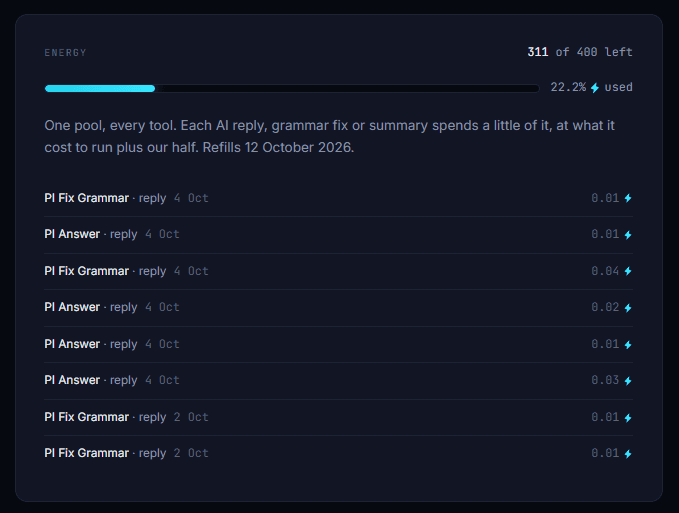
The $10 plan gives you 400 energy a month, shared by every tool. A PI Answer reply with the default PI Labs model uses about 0.01 to 0.03 energy, so that is more than 10,000 replies a month. Long threads and posts with images use a little more. Your account page shows every reply and what it cost:
Is there a daily limit?
No. There is no daily or hourly cap, only the monthly energy: use it all in one day or spread it out. If it runs out, add a one-time top-up ($20 for 800 energy, for the current month) or wait for it to refill on your billing date.
Can I use it with more than one X account?
Yes, as many as you like. Your plan belongs to your PI Labs account (the Google account you sign in with), not to an X account, so PI Answer and PI Fix Grammar work on whichever X account you have open. You can also sign in on up to 5 browsers or computers at once, for example one Chrome profile per X account. They all share the same monthly energy.
What plans are there?
Three, with the same features in all of them. Only the monthly energy differs: Basic $10 (400 energy), Standard $20 (800) and Pro $95 (4,400). Live voice conversations in Ciocu use much more energy than text replies, so a bigger plan is for people who talk to Ciocu a lot.
Can PI Answer reply to posts with images?
Yes. PI Answer reads the images in a post along with its text, so the reply can speak to what the picture shows, not just the caption. If you switch to an engine that cannot see images, it drafts from the text alone.
Does this work in Edge, Brave or Arc?
Any Chromium browser that installs Web Store extensions will run them. The on-device model needs a recent Chrome build, and every tool falls back cleanly when it is missing.